Pinterest Advertising in 2026: All Ad Formats, Budgets and Setup Guide

Pinterest in 2026 reaches 537+ million monthly active users, and 85% of them purchase a product they’ve seen on a Pin every week. Pinterest advertising works differently from Meta or TikTok: users come with intent — they already search for ideas and are ready to buy. This guide covers every Pinterest ad format in 2026, campaign setup from scratch, real budgets and the mistakes to avoid.
What is Pinterest advertising and why it works in 2026
Pinterest is a visual search engine where users look for recipes, home renovation, fashion, travel, weddings, interiors and gift ideas. Unlike Instagram or TikTok where people scroll passively, Pinterest users come with intent: to find, to plan, to buy.
What’s happening on the platform in 2026:
- 537M+ monthly users — an all-time platform record
- 40% are Gen Z, the fastest-growing audience segment
- 85% of Pinners purchase a product from a Pin every week
- 96% of searches on Pinterest are unbranded — a clean audience for new businesses
- Pinterest Performance+ — AI campaigns that pick audiences, creatives and bids on their own (Meta Advantage+ analogue)
- API for Conversions (CAPI) — server-side conversion tracking after iOS and Chrome restrictions
Pinterest is the ideal platform for niches with a visual product: e-commerce, fashion, beauty, home and interior, food, weddings, DIY, education, travel and financial services aimed at women 25–44 and Gen Z.
Every Pinterest ad format in 2026
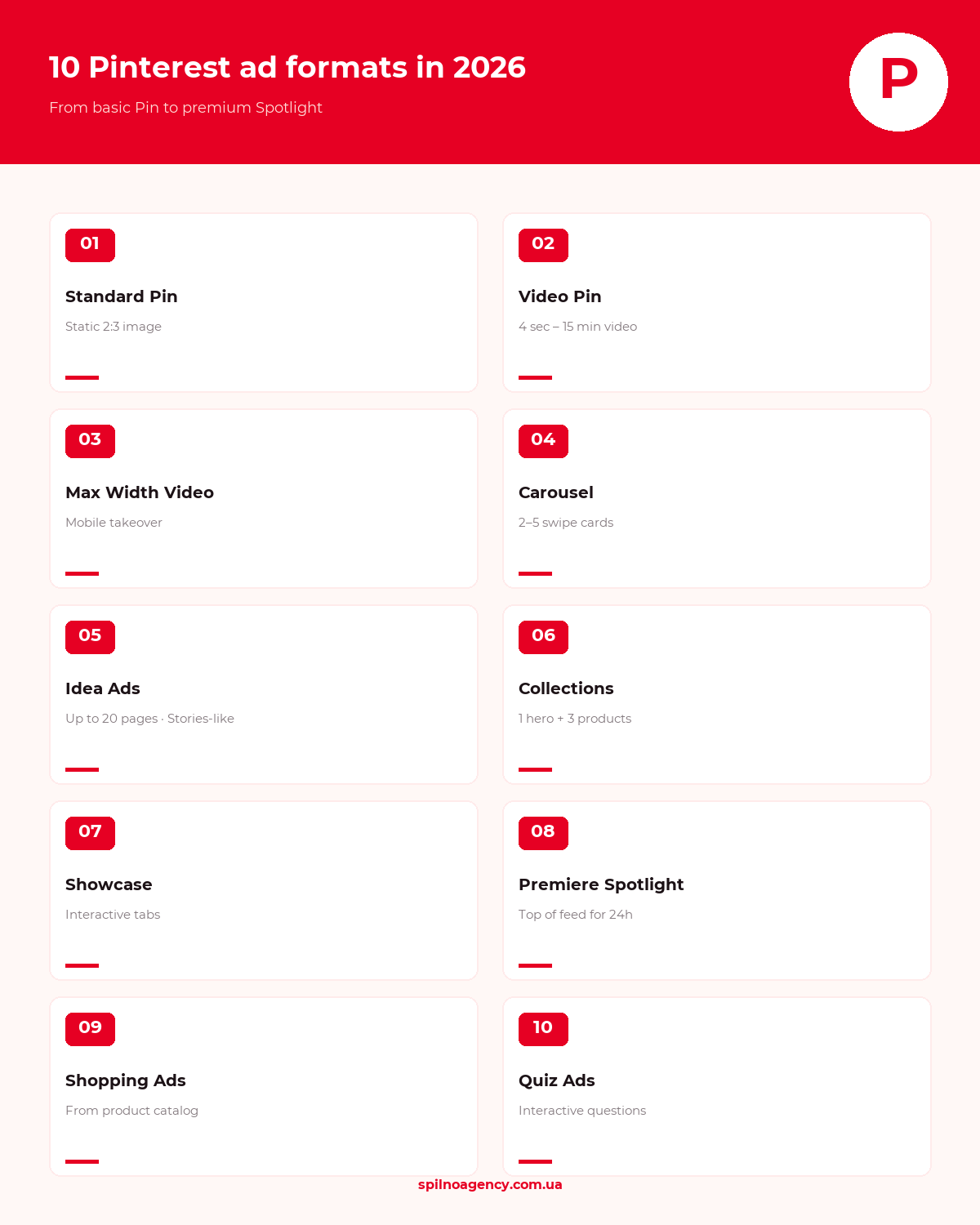
Pinterest offers 10 ad formats. They’re not equally effective for every goal — choose by funnel stage.
1. Standard Pin (static promoted pin)
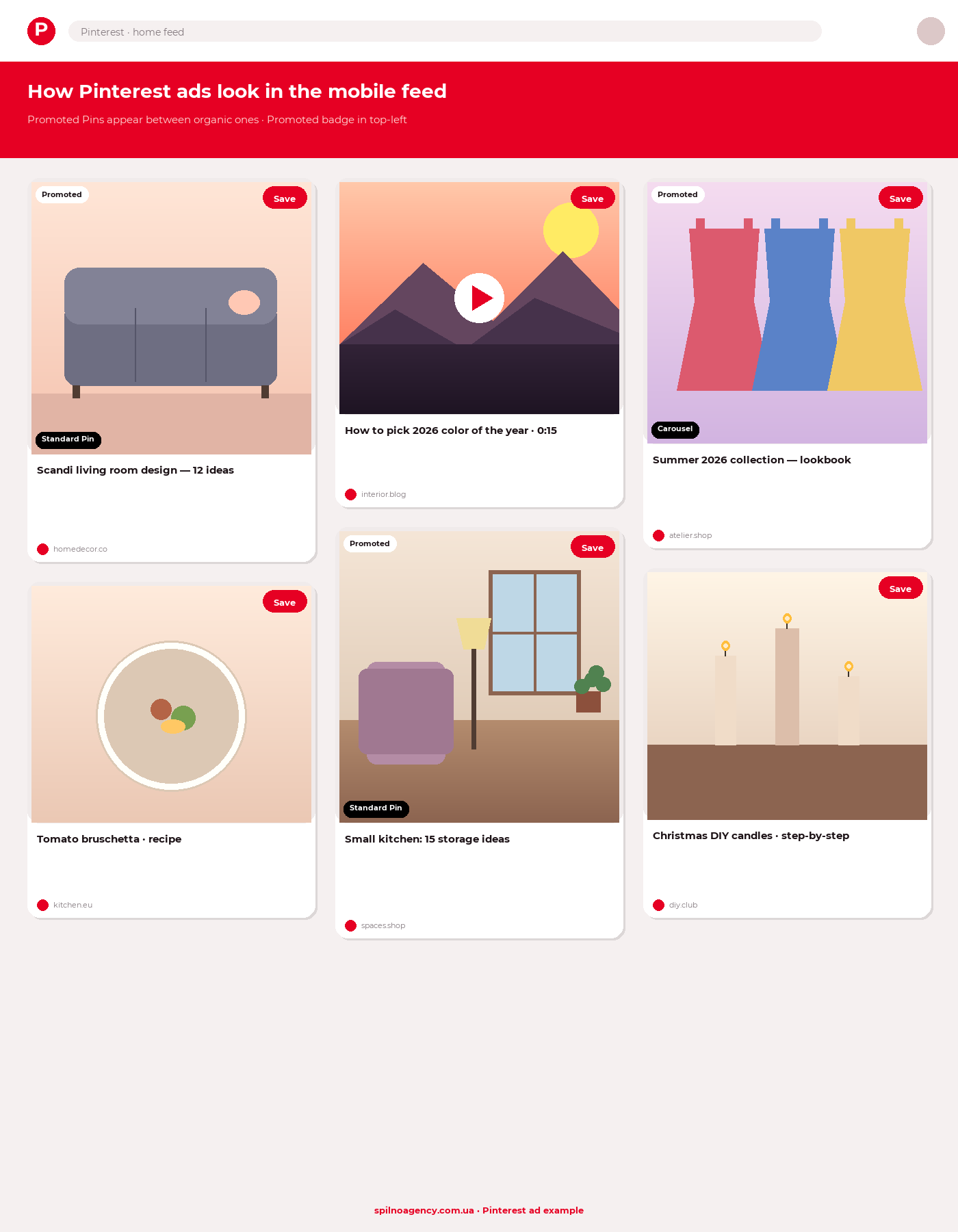
The baseline format — a regular image with a title and description. Works like a promoted Pin in the feed and search results. Best aspect ratio is 2:3 (1000×1500 px). Suitable for almost every objective: traffic, conversions, brand awareness.
2. Standard Video Pin
Video from 4 seconds up to 15 minutes (6–15 sec is optimal). Autoplays without sound, so the key message must be clear visually. Ratios: 1:1, 2:3, 9:16. Works for every goal, especially performance conversions.
3. Max Width Video Pin (mobile takeover)
Full-width mobile video that occupies the entire feed width with no margins. A premium format for brand campaigns and product launches. Available for Brand Awareness and Consideration objectives.
4. Carousel Pin
From 2 to 5 swipeable images. Each card can have its own URL — convenient for showing product variants, process steps or several SKUs from a single collection. Format: 1:1 or 2:3.
5. Idea Ads
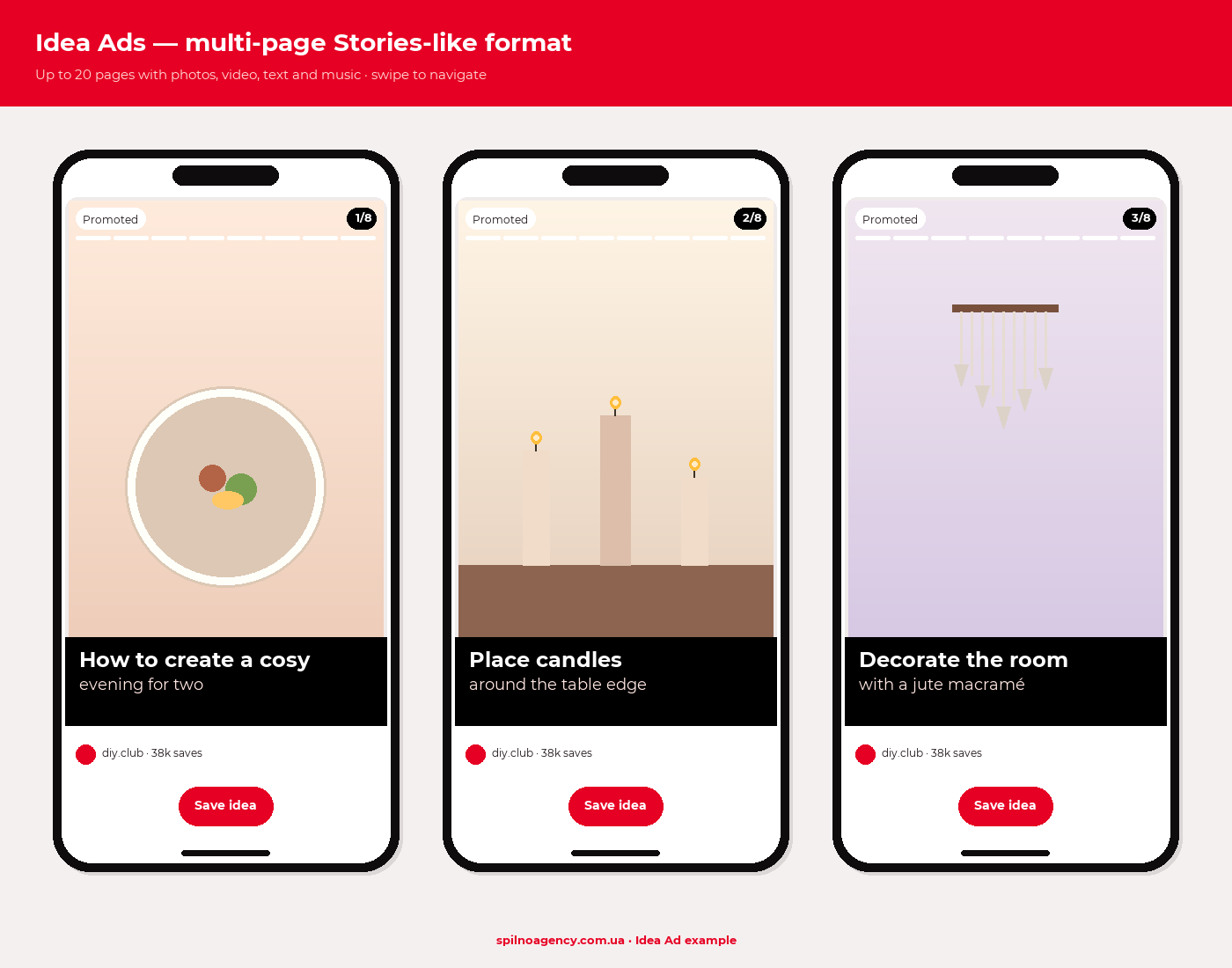
Multi-page vertical format — the Pinterest equivalent of Stories or TikTok. Up to 20 pages with images, video, text overlays and music. Great for storytelling, tutorials, how-to guides. Fits brands running content marketing on Pinterest.
6. Collections Ads
One large hero visual plus 3 smaller product cards underneath. Tapping any card opens a full-screen showroom. The best format for e-commerce with multiple similar items — sofas, dresses, accessories.
7. Showcase Ads
Interactive format: a single Pin contains multiple tabs the user can swipe through. Lets you show one brand from several angles — product lines, color options, use cases. Released to all advertisers in 2024.
8. Premiere Spotlight
Premium 24-hour placement at the top of the Pinterest home feed. Delivers up to 50M impressions depending on market. Built for big launches, movie premieres, retail seasons. Sold via Pinterest direct sales, not the self-serve dashboard.
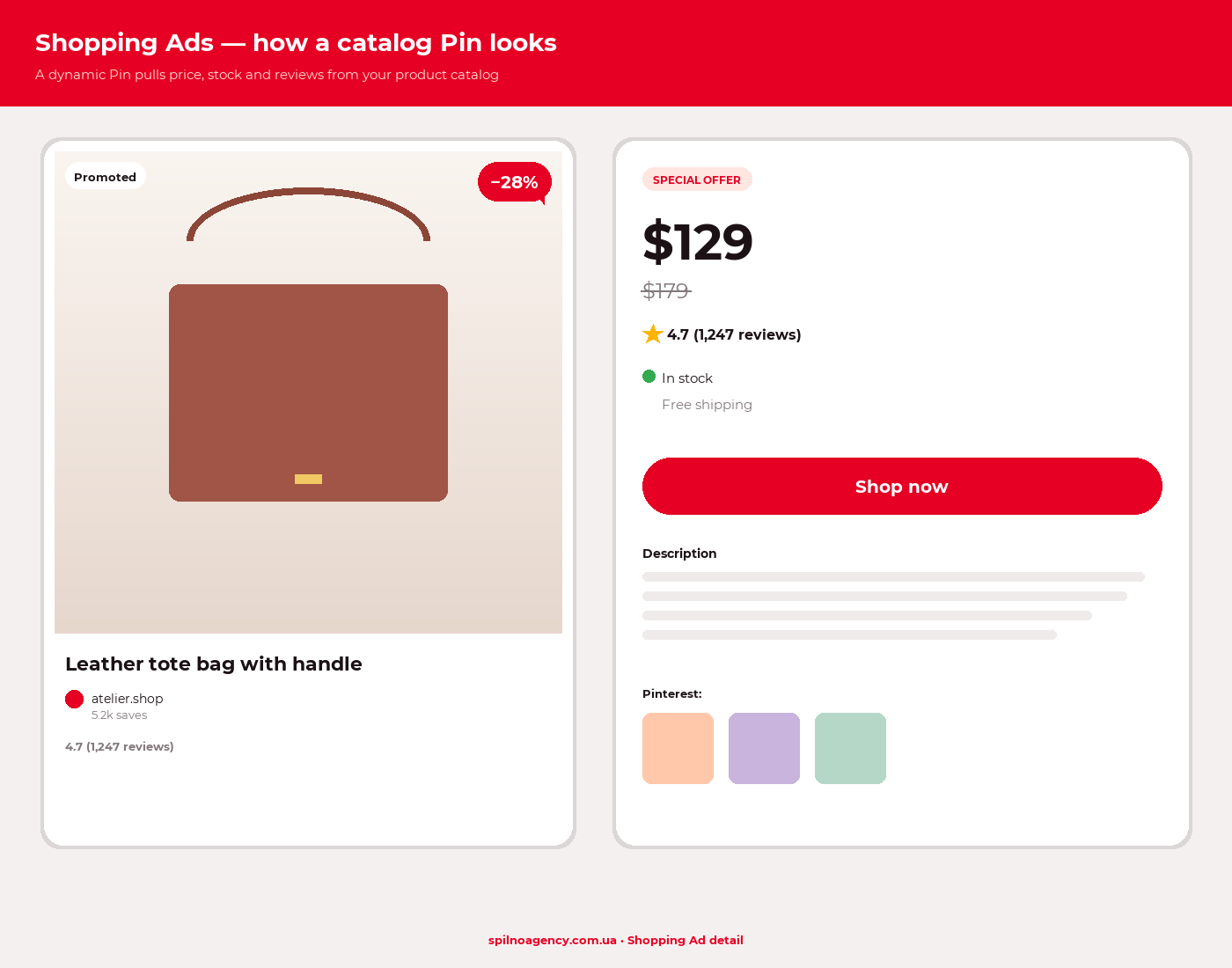
9. Shopping Ads (Product Pins)
Dynamic ad Pins fed by your product catalog (price, availability, reviews). They work like Google Shopping inside Pinterest: users see the photo, the price and go straight to the product page. Requires a Product Catalog uploaded to Pinterest Business.
10. Quiz Ads (interactive)
A question-and-answer format where the user answers 2–3 questions and gets a personalised recommendation. Works best for beauty, fashion, fitness and fintech services. Boosts engagement 2–4× compared with a regular Pin.
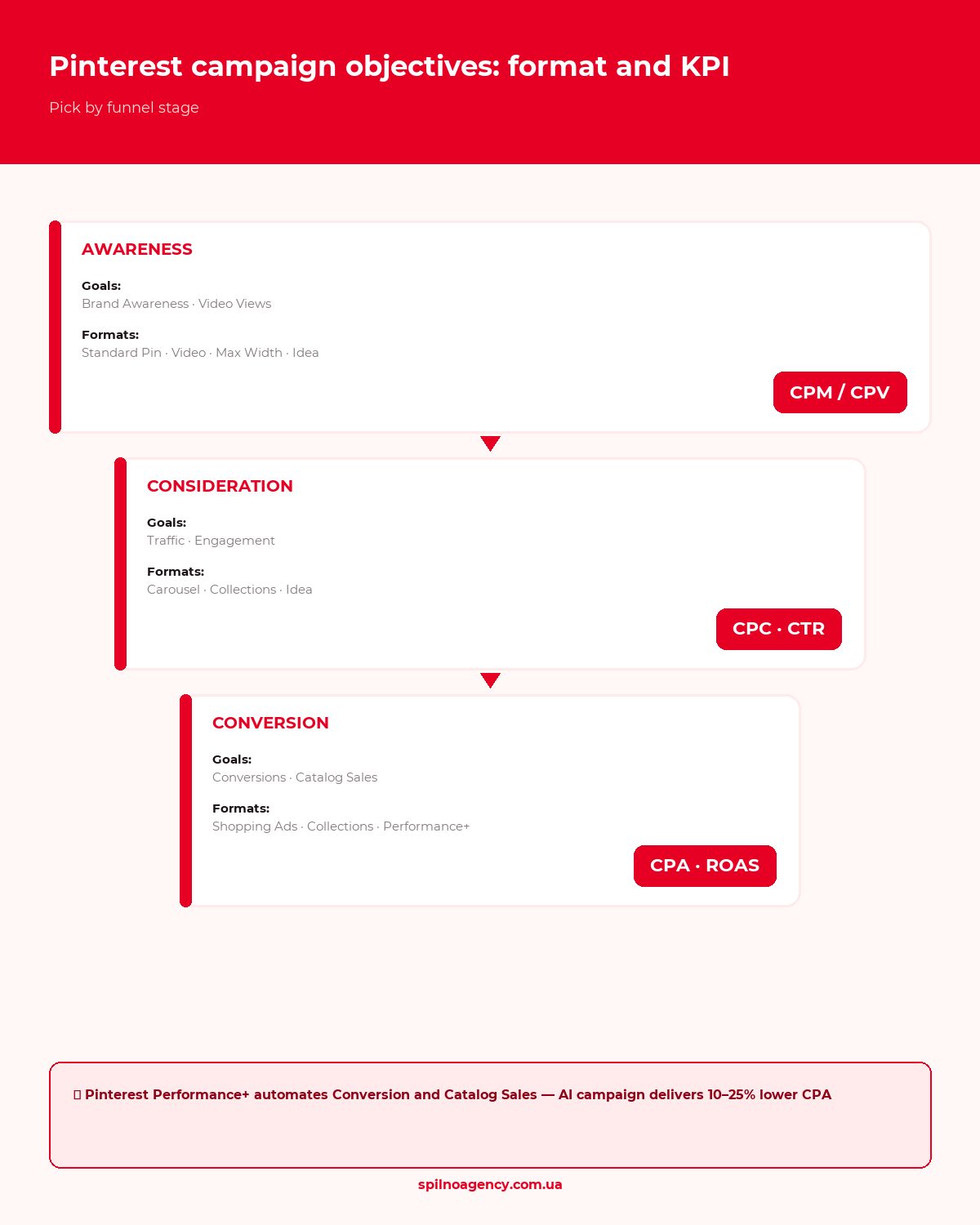
Campaign objectives: which format fits which goal
Pinterest offers 6 campaign objectives. Budget is distributed differently for each one.
- Brand Awareness — reach the largest audience. Pay CPM. Formats: Standard Pin, Video, Max Width Video, Idea Ads
- Video Views — optimise for video views. Pay CPV. Formats: all video formats
- Consideration (Traffic) — clicks to your site. Pay CPC. Formats: all Pins, Carousel, Collections
- Conversions — purchases, leads, signups. Requires Pinterest Tag + CAPI installed. Formats: all
- Catalog Sales — sales from the product catalog. Formats: Shopping Ads, Collections, Carousel
- Offline Sales (beta) — offline sales tracked via CRM integration
How to set up Pinterest advertising: 7 steps
Step 1. Create a Pinterest Business account
Go to business.pinterest.com and click Create account. If you already have a personal profile, convert it to business via settings. Verify your website domain via meta tag or DNS to unlock analytics and advanced formats.
Step 2. Install Pinterest Tag and CAPI
Pinterest Tag is the conversion-tracking pixel. In 2026 you must also add API for Conversions (CAPI) — the server-side data channel. Without CAPI you lose 20–40% of conversions due to iOS limits and cookie blocking.
- In Ads Manager open Conversions → Pinterest Tag and copy the code
- Install Pinterest Tag via GTM (recommended) or manually in
<head> - Configure events:
PageVisit,AddToCart,Checkout,Signup - Enable CAPI via Shopify, WooCommerce, Stape or a custom server
- Verify with the Pinterest Tag Helper Chrome extension
Step 3. Upload your product catalog (e-commerce)
Shopping Ads and Collections require a feed. Pinterest supports:
- Direct feed (CSV, XML) — refreshes once a day
- Shopify integration — auto-syncs
- WooCommerce integration — via the official plugin
- Upload via the Pinterest API
Step 4. Create a campaign in Ads Manager
Open ads.pinterest.com → Create campaign. Pick the objective (Brand Awareness, Traffic, Conversions etc.). Name the campaign with the mask: [Region]-[Category]-[Objective]-[Date], e.g. EU-Furniture-Conv-202610.
Step 5. Configure the ad group
At ad-group level you set targeting, budget and bids. Pinterest offers 4 targeting types:
- Keywords — search terms users type into Pinterest (e.g. “wedding decor”, “capsule wardrobe”). Up to 2000 keywords per ad group
- Interests — pre-built interest categories (Pinterest classifies users automatically)
- Demographics — gender, age, location, language, device
- Audiences — custom: List Customer (CRM list), Visitor (retargeting), Actalike (lookalike), Engagement (Pin interactors)
Spilno Agency tip: start with broad keywords + interests. Pinterest learns faster on broad signals than on a narrow keyword list.
Step 6. Upload creatives
Pinterest is a visual platform — creative = 80% of success. Rules:
2:3ratio (1000×1500 px) is the priority- Text on the image must cover no more than 20% of the area
- Logo in a corner, not centred
- High contrast, branded colors
- Lifestyle photos outperform studio shots
- Use Pinterest Trends to find seasonal themes
Step 7. Launch and monitor
Launching is only the start. The first 7–14 days are the learning phase. During that window do not change bids, creatives or targeting drastically — Pinterest will reset its learning. Let the algorithm collect at least 50 conversions per ad group before your first edits.
How much does Pinterest advertising cost in 2026
Budgets sit below Meta and Google Ads, making Pinterest cost-effective for testing.
- CPM — $2–$10 (US/EU), $0.5–$3 (CEE markets)
- CPC — $0.10–$1.50 depending on niche
- CPV (video) — $0.05–$0.30
- CPA (conversions) — $5–$50 for e-commerce
- Minimum ad-group budget — $5/day for testing, $20/day recommended
Premiere Spotlight is its own story: from $50K to $1M+ depending on market and season. A format for major brands.
Pinterest Performance+ and 2026 AI tools
In 2024 Pinterest launched Performance+ — the equivalent of Meta Advantage+ Shopping. It’s an automated campaign where AI picks audiences, budget, bids and tests creatives. In 2026 Performance+ covers Conversions and Catalog Sales objectives and on average delivers 10–25% lower CPA than manual campaigns.
Other AI tools available:
- Pinterest AI Background — generates lifestyle backgrounds for product photos (since 2024)
- Smart Bidding — automated bids for target CPA or ROAS
- Predictive Audiences — AI identifies audiences with similar purchase behavior, no list required
- Brand Suitability AI — context filter for where your Pins appear
5 common mistakes when launching Pinterest ads
- Creative in 1:1 instead of 2:3 — a square image occupies less feed space and loses 20–40% CTR vs. vertical.
- Launching without Pinterest Tag and CAPI — without pixel data the algorithm can’t optimise for conversions. Bids rise, ROAS falls.
- Tweaking the campaign in the first 7 days — bid, creative or targeting changes reset the learning phase. Pinterest restarts learning.
- Narrow targeting from the start — 50 keywords and one interest aren’t “precision”, they’re “starvation”. The algorithm doesn’t get enough data. Start with broad + interests.
- One creative per ad group — Pinterest recommends 2–4 creatives per group for A/B testing. The algorithm picks the winner and reallocates budget.
FAQ
Is it worth running Pinterest ads in the European market?
Yes — Pinterest in Europe sees rapid growth, especially in DACH, France, the UK, Italy, Spain and Poland. Average order value and conversion rates are strongest for “home, beauty, fashion, food, weddings” verticals. Pinterest is also ideal for European brands selling to North America.
Can I run Pinterest ads without a website?
Technically yes — you can drive traffic to your Pinterest profile (Brand Awareness, Engagement). But without a site you can’t track conversions or use Performance+. For sales, a website or at least a landing page is mandatory.
How is Pinterest different from Instagram Ads and Meta Ads?
Instagram users scroll the feed for entertainment — ads need to interrupt them. Pinterest users come searching for ideas — ads look like part of the search results. As a result, CTR on Pinterest is 30–50% higher on average, and CPA is lower for visual-product niches.
What is Pinterest Trends and how do I use it?
trends.pinterest.com is a free tool showing keyword popularity over the past 12 months, broken down by region and demographics. Used for planning seasonal campaigns (Christmas, Valentine’s, back-to-school) and discovering new niches.
How long until Pinterest Ads delivers results?
Impressions and clicks appear within hours. Conversions come after the learning phase (7–14 days). Stable ROAS arrives at week 4–8 from launch. Pinterest requires more patience than Meta but delivers a longer “long tail” — Pins keep selling for months after the campaign ends.
How Spilno Agency runs Pinterest advertising
We launch and manage Pinterest Ads for e-commerce, fashion, beauty and interior brands across European and North American markets. Our approach covers everything from Pinterest Tag and CAPI installation to weekly reports broken down by format and ROAS corridor. If you need a Pinterest launch from scratch or an audit of existing campaigns — get in touch.

Read also
Google Tag Manager Workspaces: Why You Need Them and How to Use Them in 2026
A workspace in Google Tag Manager is a “draft” of a container — a place to safely edit…
How to Track Revenue, Transactions and Purchases in Google Analytics 4 from WordPress WooCommerce
Introduction WooCommerce store owners are often convinced that Google Analytics 4 already shows them revenue, transaction counts and…
How to Analyze Hourly Statistics in Google Analytics 4
Google Analytics 4 has no dedicated “hourly statistics” menu item, but you can get that exact breakdown in…