Snapchat Ad Specs & Creative Sizes in 2026 — Full Guide

Every Snapchat ad is built around one standard — a vertical 1080×1920 px, 9:16 aspect ratio, full screen. But each format (Single Image, Video, Story, Collection, Commercials, Spotlight, Filters, AR Lenses) has its own requirements for tile sizes, duration, file weight, codec and safe zones. This guide gives you the full Snapchat ad specs table for 2026, the technical requirements for every format, where the safe zones sit, character limits for text, and a pre-upload checklist to get your creative through Snapchat Ads Manager on the first try.
The base standard: 9:16, 1080×1920, full screen
Snapchat is a fully vertical platform. Unlike Meta or Google, there are no square or horizontal in-feed placements: the user holds the phone vertically and views content full screen. So the base creative size for every Snapchat Ads format is 1080×1920 pixels at a 9:16 aspect ratio. It’s the same size as Instagram Stories, Reels or TikTok, so a single vertical master file works across all platforms at once.
Three aspect ratios must match in Snapchat: storage, display and pixel aspect ratio — all 9:16. If you upload anamorphic (stretched-pixel) video or footage with black bars, the system will either reject the creative or crop it incorrectly. The minimum resolution is 720p, but the recommended and de-facto standard is 1080×1920 px.
Below is the complete Snapchat ad specs and dimensions table for every format in 2026. This is the master reference to come back to whenever you prepare a creative.
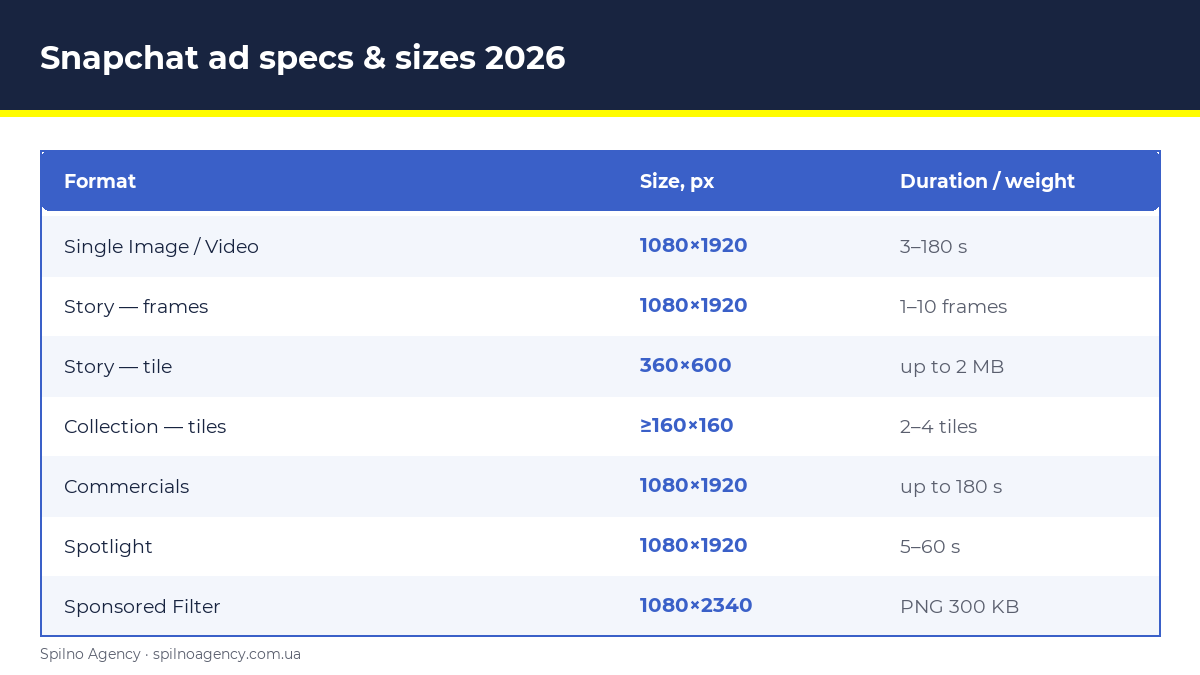
Snapchat ad specs table 2026 (all formats)
| Format | Size, px | Ratio | File type | Max weight | Duration |
|---|---|---|---|---|---|
| Single Image / Video (Snap Ad) | 1080×1920 | 9:16 | JPG, PNG / MP4, MOV | 1 GB | 3–180 s |
| Story Ad — frames | 1080×1920 | 9:16 | JPG, PNG / MP4, MOV | 1 GB | 3–180 s, 1–10 frames |
| Story Ad — tile | 360×600 | 3:5 | JPG, PNG | 2 MB | — |
| Collection — hero creative | 1080×1920 | 9:16 | JPG, PNG / MP4, MOV | 1 GB | 3–180 s |
| Collection — product tiles | ≥160×160 | 1:1 | JPG, PNG | — | 2–4 tiles |
| Commercials | 1080×1920 | 9:16 | MP4, MOV | 1 GB | up to 180 s (6 s non-skip) |
| Spotlight Ads | 1080×1920 | 9:16 | MP4, MOV | 1 GB | 5–60 s |
| Dynamic / Catalog Ads | 1080×1920 / 1080×1080 | 9:16 / 1:1 | JPG, PNG | — | — |
| Sponsored Filter | 1080×2340 | — | PNG (transparent) | 300 KB | — |
| AR Lens | Lens Studio | 9:16 | .lns package | — | — |
Now let’s break down each format: where these sizes apply, the nuances, and what to watch so your creative isn’t rejected at moderation.
Single Image & Video Ads (Snap Ads)
The base and most common format: a full-screen vertical photo or video that appears between friends’ Stories, in Discover or Spotlight. Every other format is essentially built on these same specs.
- Size:
1080×1920 px, 9:16 aspect ratio, full screen. - File type: image — JPG or PNG; video — MP4 or MOV (H.264 codec).
- Max weight: up to 1 GB.
- Video duration: 3–180 seconds. Optimal — 3–6 s for awareness, 10–15 s for conversion campaigns. Video under 3 s auto-loops.
- Audio: not formally required, but most of the audience watches with sound on — silent creative underperforms.
- Text: brand name up to
25 characters, headline up to34 characters.
Story Ads
A branded sequence of frames in Discover. A Story Ad has two parts — the tile the user taps, and the frames inside the story.
- Tile:
360×600 px, 3:5 ratio, JPG or PNG, up to 2 MB. This is the story’s cover in Discover. - Story frames: 1 to 10 frames, each at standard
1080×1920 px, 9:16, image or video, up to 180 s each. - Tile text limits: brand name up to 25 characters, headline up to 34 characters.
Story Ads are ideal for sequential storytelling: unboxing, step-by-step demos, or several offers in one placement.
Collection Ads
An e-commerce format: one hero photo/video plus a row of tappable product tiles at the bottom of the screen.
- Hero creative: standard
1080×1920 px, 9:16, image or video. - Product tiles: 2, 3 or 4 square images, each
≥160×160 px, 1:1 ratio, JPG or PNG. - Safe zone: because of the bottom tile row, keep roughly
450 pxof the bottom area clear of key text and logos.
Commercials
A premium video format inside professional Discover content. The first up to 6 seconds are non-skippable, and total length goes up to 180 seconds.
- Size:
1080×1920 px, 9:16. - File type: MP4 or MOV (H.264), up to 1 GB.
- Duration: up to 180 s; the first 6 s are guaranteed views.
- Recommendation: put the key message and brand in the first 6 seconds, while the user can’t skip.
Spotlight Ads
Ads in the short vertical Spotlight feed — Snapchat’s answer to the TikTok For You feed. The creative should look organic, like a regular creator’s clip, not a polished production.
- Size:
1080×1920 px, 9:16. - File type: MP4 or MOV, up to 1 GB.
- Duration: 5–60 seconds (stay in this range for best reach).
- Style: vertical video with sound, creator-style, hook in the first 1–2 seconds.
AR Lenses and Sponsored Filters
These are Snapchat’s signature AR formats. They aren’t uploaded as regular video — they have their own requirements.
- AR Lens (Sponsored Lens): built in the free Lens Studio app by Snap Inc. Exported as a
.lnspackage. Orientation — vertical 9:16; weight limits depend on lens type (Snap recommends keeping the package as light as possible for fast mobile loading). - Sponsored Filter: a static frame overlay. Size
1080×2340 px, PNG with a transparent background, up to 300 KB. The design should leave the center of the screen free — the filter frames the shot at the top/bottom rather than covering the face.
Safe zones: where NOT to place text and logos
The most common cause of “weak” creatives is key elements sliding under the Snapchat interface. The platform draws its own UI over your video: the brand avatar and profile at the top, the action button (CTA / swipe-up) and attachment at the bottom. If your text or logo falls into those zones, it simply isn’t visible.
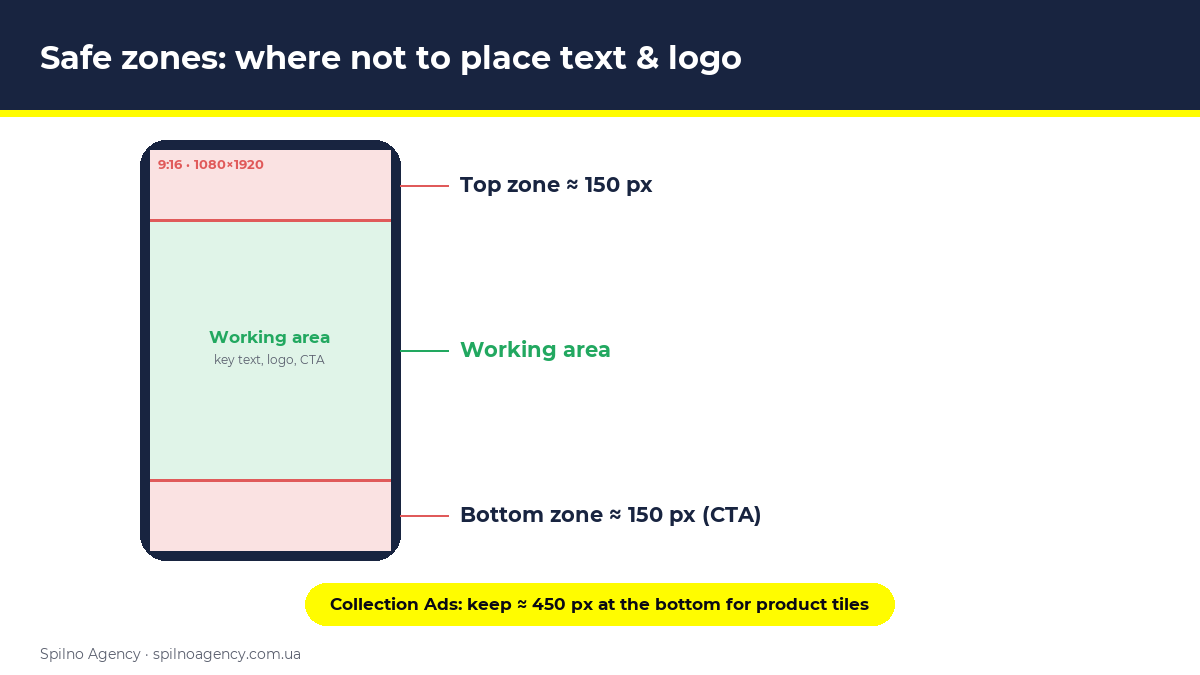
- Top safe zone: roughly
150 pxat the top — keep clear of key text, logos and CTAs. - Bottom safe zone: roughly
150 pxat the bottom for standard Snap Ads (the action button sits there). For Collection Ads — about450 pxat the bottom under the tile row. - Working area: place the key message, logo and text in the central part of the frame — roughly the central
1080×1620 px. - Rule: logos, the core message, prices, disclaimers and CTA — only in the safe central zone.
Video and text technical requirements
Beyond sizes, a few technical parameters are the most frequent reasons creatives get rejected at moderation:
- Video codec: H.264, container
.mp4or.mov. - Audio codec: AAC. Sound is recommended — most of the audience watches with sound.
- Resolution: minimum 720p, recommended
1080×1920 px. - Frame rate: standard 24–30 fps.
- File weight: up to 1 GB for video; Story tile up to 2 MB; filter up to 300 KB.
- Brand Name: up to
25 characters. - Headline: up to
34 characters. - Captions: burn text into the video — some users still watch without sound.
Pre-upload creative checklist
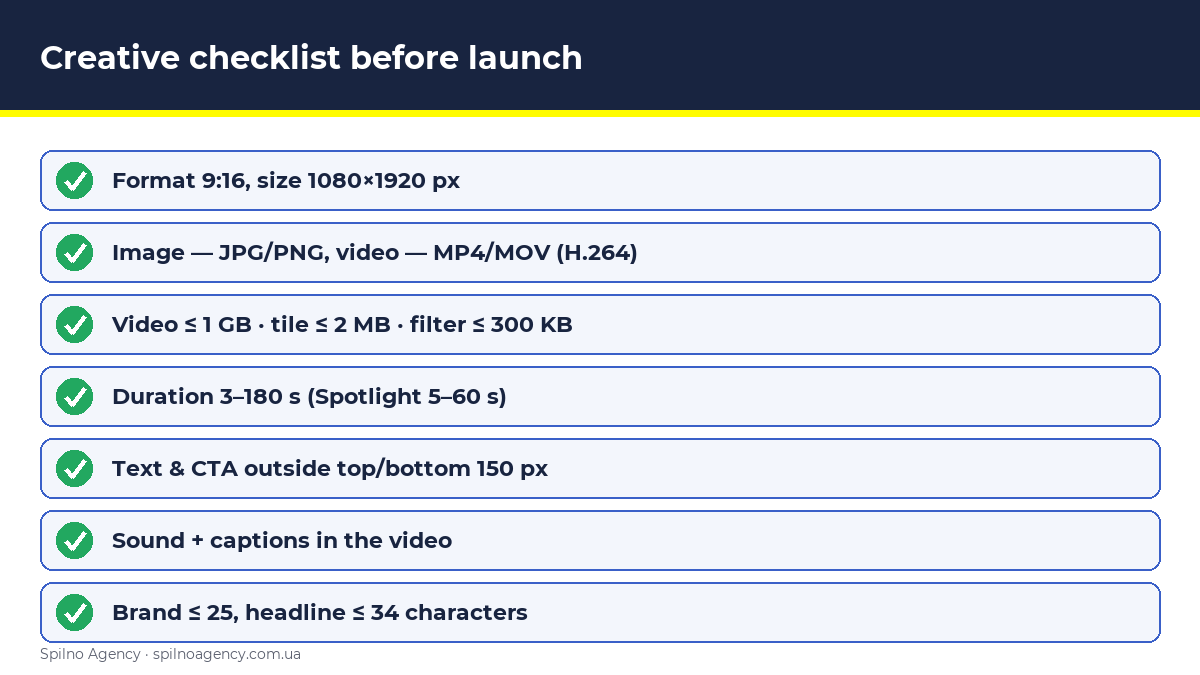
- Format strictly 9:16, size
1080×1920 px(storage = display = pixel ratio). - File type per format: image — JPG/PNG, video — MP4/MOV (H.264).
- Weight within limits: video ≤ 1 GB, Story tile ≤ 2 MB, filter ≤ 300 KB.
- Duration within range (3–180 s for Snap/Commercials, 5–60 s for Spotlight).
- Key text, logo and CTA in the central zone, outside the top 150 px and bottom 150 px (450 px for Collection).
- Sound present; text duplicated as captions in the video.
- Brand name ≤ 25 characters, headline ≤ 34 characters.
- Hook in the first 1–2 seconds, brand and message in the first 3–6 seconds.
- For Collection — 2–4 square product tiles ≥160×160 px prepared.
- Previewed in Snapchat Ads Manager before launch.
Common Snapchat creative size mistakes
- Creative in 16:9 or 1:1. Snapchat is vertical 9:16 only. Any other ratio adds black bars or crops and cuts metrics.
- Text in the safe zone. A logo or CTA under the Snapchat UI — the user never sees it.
- Too low resolution. Uploading 720×1280 instead of 1080×1920 looks blurry on modern screens.
- Wrong codec. Video not in H.264 / not .mp4-.mov may be rejected.
- Oversized Story tile. A tile over 2 MB or not 360×600 won’t pass moderation.
- Filter without transparency. A Sponsored Filter must be a PNG with a transparent background, or it covers the whole frame.
- Video under 3 seconds for a Snap Ad. It loops, which doesn’t always look right.
Conclusion
There’s one number to remember — 1080×1920 px, 9:16. It’s the base for Snap Ads, Story, Collection, Commercials and Spotlight. The rest of the differences are in the tiles (Story tile 360×600, product tiles ≥160×160), duration (Spotlight 5–60 s, others up to 180 s), weight (video 1 GB, tile 2 MB, filter 300 KB) and safe zones (150 px top and bottom, 450 px for Collection). Follow the table above and your creative passes moderation the first time, while the Snapchat interface doesn’t “eat” your message.
If you’re taking a brand to European or MENA markets and planning Snapchat as part of your paid-social strategy — request a consultation, and we’ll prepare creatives for every format and set up campaigns around your goal.
Why it pays to produce the maximum number of creatives
The more distinct creatives you feed the Snapchat Ads system, the larger the share of the audience your campaign can reach. Each creative hooks its own segment — different pain points, visual styles and messages resonate with different people. Broader reach of a relevant audience feeds straight into the auction: the system finds more cheap, high-quality impressions and the average cost per click drops.
The second reason is the trigger itself. It’s the creative that decides whether a user stops and reacts to the offer, so its idea and execution directly determine campaign performance. One or two layouts give the algorithm no room to optimize — there’s nothing to pick a winner from. With many creatives, the system quickly discards the weak ones and scales those with the lowest cost per action. So the rule is simple: prepare as many variants as you can in every required size — and refresh them regularly to avoid creative fatigue.
FAQ: Snapchat ad sizes and creative requirements
What size are Snapchat ads?
The standard Snapchat creative size is 1080×1920 pixels, a 9:16 aspect ratio, full screen. This is the base size for Snap Ads, Story Ads, Collection, Commercials and Spotlight.
What aspect ratio do Snapchat ads use?
9:16 (vertical). Storage, display and pixel aspect ratio must all match at 9:16. Square (1:1) or horizontal (16:9) creatives aren’t used, except for the square product tiles in Collection Ads.
What is the maximum length of a Snapchat video ad?
For Single Video, Story and Commercials — up to 180 seconds. For Spotlight Ads — 5–60 seconds. Recommended duration for awareness is 3–6 seconds, as short clips hold attention better.
What is the maximum file size for a Snapchat ad?
For video — up to 1 GB. Story Ad tile — up to 2 MB. Sponsored Filter — up to 300 KB. Exceeding the limit blocks the upload or moderation.
Where are the safe zones in Snapchat ads?
Roughly 150 px at the top and 150 px at the bottom are taken by the Snapchat interface (profile and action button). For Collection Ads, keep about 450 px of the bottom clear. Place key text, logo and CTA in the central frame zone.
What file format works for Snapchat ads?
Images — JPG or PNG. Video — MP4 or MOV with H.264 and AAC audio. Sponsored Filter — PNG with a transparent background. AR Lens — a .lns package from Lens Studio.
How many characters are allowed in Snapchat ad text?
Brand Name — up to 25 characters, Headline — up to 34 characters. Put the rest of the information into the video as captions.

Order Snapchat Ads advertising
Spilno Agency produces creatives in every format and runs Snapchat Ads campaigns for European brands — from concept and layout production to targeting, bid optimization and reporting. Get in touch — let’s sort it out together.

Read also

What Is an API: What It Means and How to Work With It in 2026
An API (Application Programming Interface) is a set of rules that lets one program request data or an…

Site Kit by Google: Overview and Setup Guide for WordPress
Site Kit by Google is the official WordPress plugin that brings Search Console, Analytics 4, PageSpeed Insights, Ads,…

Lawyer Lead Cost in 2026: Why Prices Vary So Much
How much does a lead really cost for law firms running Google Ads and Meta Ads in 2026?…