How to Choose Pages for SEO Optimization

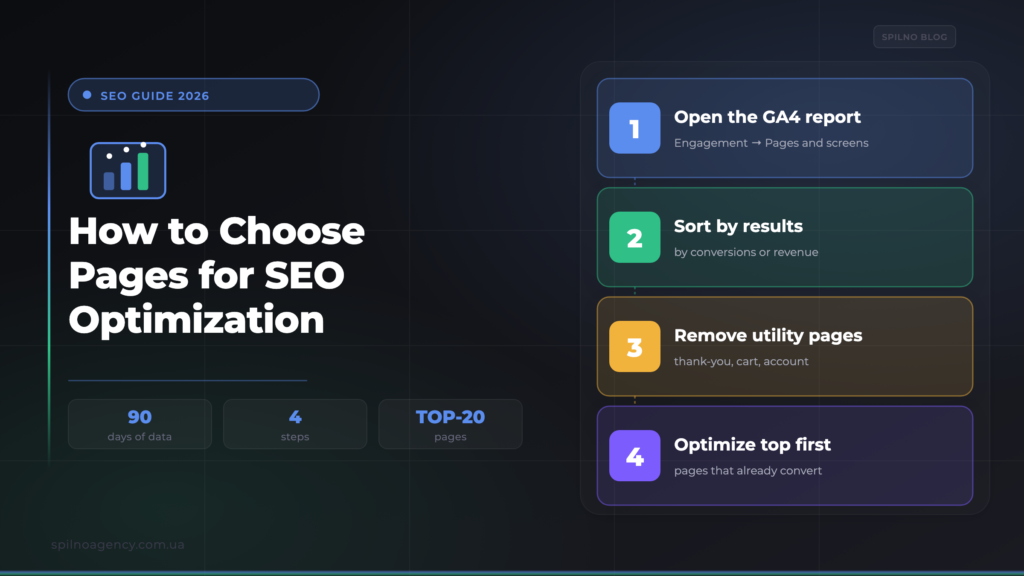
Optimizing every page of a site at once is impossible and inefficient. To get SEO results faster, start with the pages that already work: use Google Analytics to find the ones that already bring conversions, sort them by number of leads or revenue, and optimize those first. A separate trick concerns thank-you pages (/thankyou/): you should not optimize them, but they tell you which page to optimize instead. Below is a step-by-step method for choosing pages to optimize.
Why you shouldn’t optimize every page at once
An average site has dozens — sometimes thousands — of pages. Budget, specialist time and the search engine’s “patience” are all limited, so trying to push everything into the top at once spreads your resources thin and produces no noticeable result anywhere. Sound SEO always starts with prioritization: which pages to touch first so the payoff is the largest and the fastest.
A common mistake is starting with the highest-volume keywords or with the homepage “because it’s the homepage.” A far more profitable logic is different: work first with what already brings money. Plain analytics helps you find such pages — Google Analytics 4, which is most likely already installed on your site. If not, start with the guide on how to install Google Analytics.
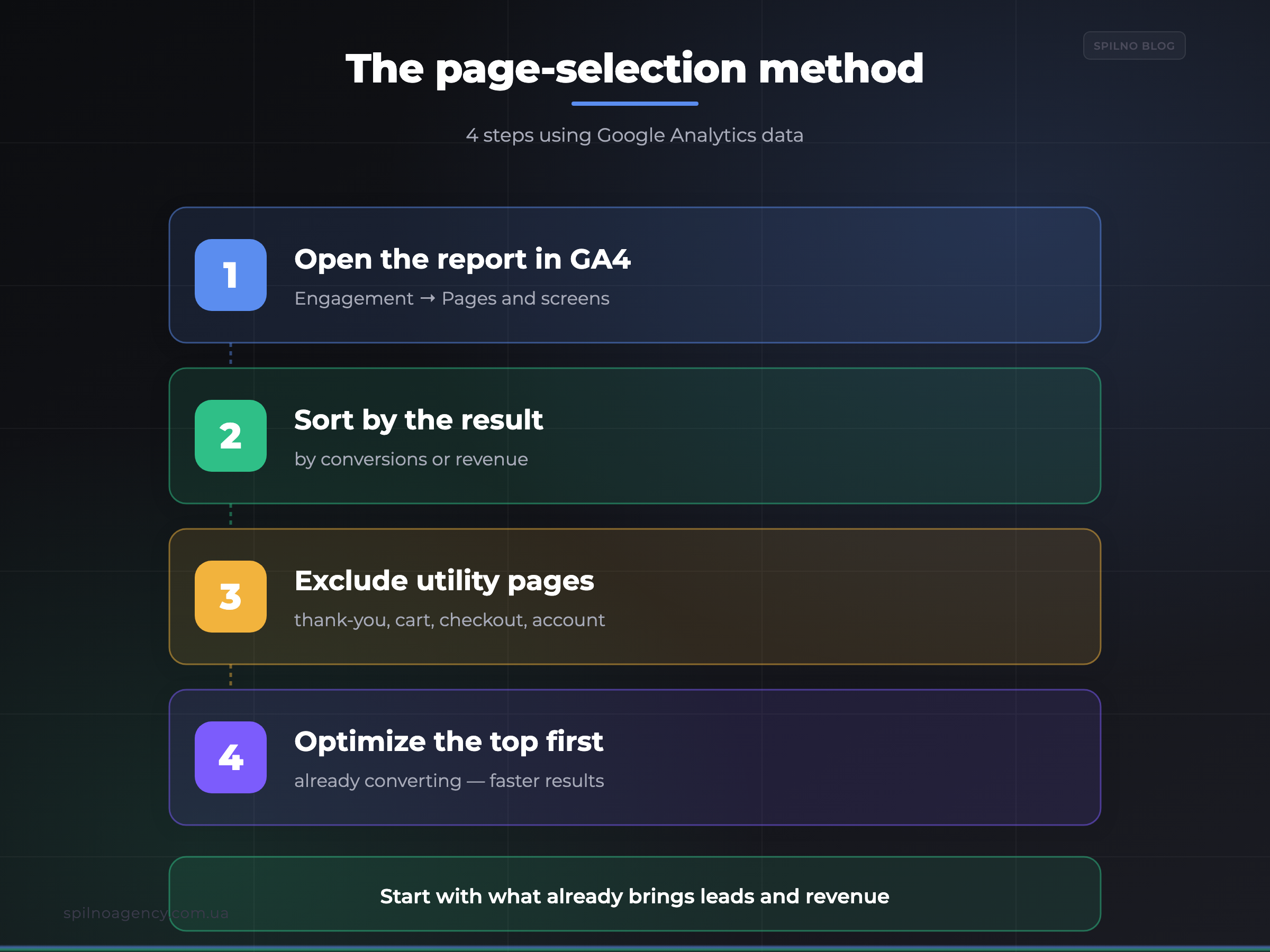
The method: choose pages by data, not by gut feeling
The idea is simple: instead of guessing which pages are “important,” we take real data about behaviour and conversions. A page that already brings leads or sales is a proven asset. It has shown that its content and offer work and that users follow through to action. Lifting such a page a few positions in search means sending more people to a layout that already converts. The result comes faster than when you “grow” a new page from zero.
For conversions to be visible at all, GA4 must have key events configured. If you haven’t yet marked leads, calls or purchases as conversions, do it following the guide on setting up events in Google Analytics 4. Without that, the pages table will show views only — not value.
Step 1. Find the pages that already convert
In Google Analytics 4, open the pages and screens report:
Reports → Engagement → Pages and screens
  └─ date range: last 90 days (enough data, still current)
  └─ in the table, click the header of the "Key events" column
     → pages sort by number of conversions (descending)
In the left-hand GA4 menu, open the «Engagement» section and choose «Pages and screens» — the report that lists every page on the site along with its metrics.
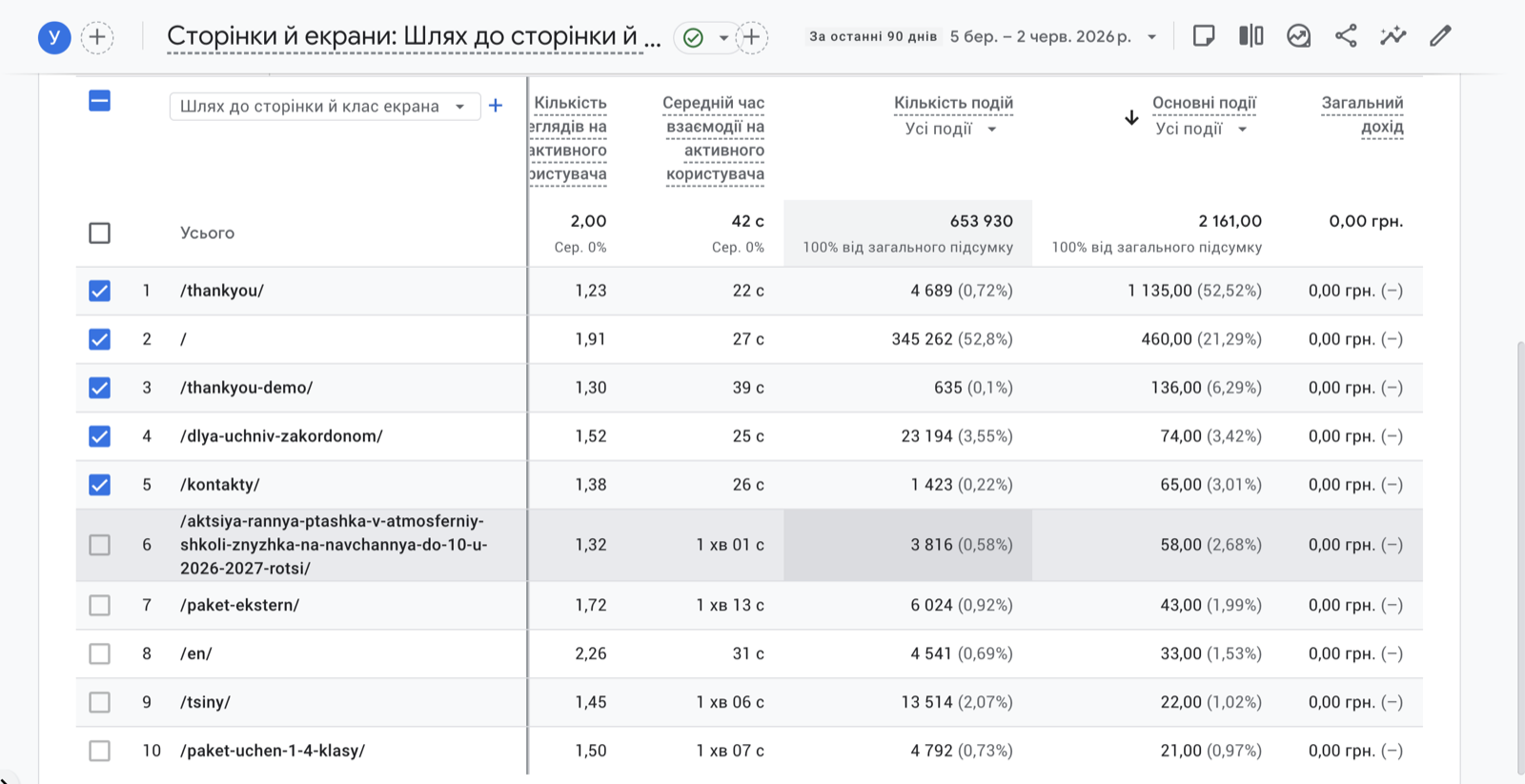
The report sorted by the «Key events» (conversions) column. The pages with the most conversions sit at the top. Note that the utility page /thankyou/ takes first place (1,135 conversions) — easy to mistake for the most important page, even though it’s not the one to optimize (more on that below). The interface language in the screenshot is Ukrainian, but the layout is identical in every GA4 account.
Each row is a page (its path, for example /contact/ or /pricing/), and the columns show views, engagement time, key events (these are your conversions) and total revenue. Once sorted by conversions, you immediately see the pages that genuinely deliver business results.
Step 2. Sort by number of conversions or revenue
Now decide which metric to sort by:
- Number of key events (conversions) — a universal metric. It fits services, B2B and lead generation, where GA4 doesn’t track revenue and the value is a form, a call or a request.
- Total revenue — the most accurate guide for online stores with ecommerce tracking. It accounts not only for the count but for the amount of purchases: a page with 10 expensive orders is worth more than one with 100 cheap ones.
Write down the top 10–20 pages from the list — that’s your “golden fund.” This is where the work begins: technical optimization, refining titles and meta, expanding content, internal linking, improving Core Web Vitals. Every improvement here is multiplied by the conversion rate the page already has.
Why start with converting pages
- Faster results. The page is already indexed and has rankings — it’s easier to lift it a few spots than to launch a new one from scratch. And every new visitor lands straight on a converting layout.
- Lower risk. You work with a proven asset: you know the offer and content “sell.” Optimization money goes into something that already pays off.
- Clear ROI. Traffic growth on a converting page is easy to translate into extra leads or revenue — the simplest way to prove the value of SEO to the business.
- A base for scaling. Once you understand why these pages convert, you transfer the winning solutions (structure, calls to action, trust blocks) to other pages on the site.
A special case: thank-you pages (/thankyou/) — look at the previous page
Once you sort pages by conversions, you’ll almost certainly see a page like /thankyou/, /order-received/, /success/ or /thanks/ at the top. The instinct is to rush in and optimize it — after all, “it has the most conversions.” That’s a trap.
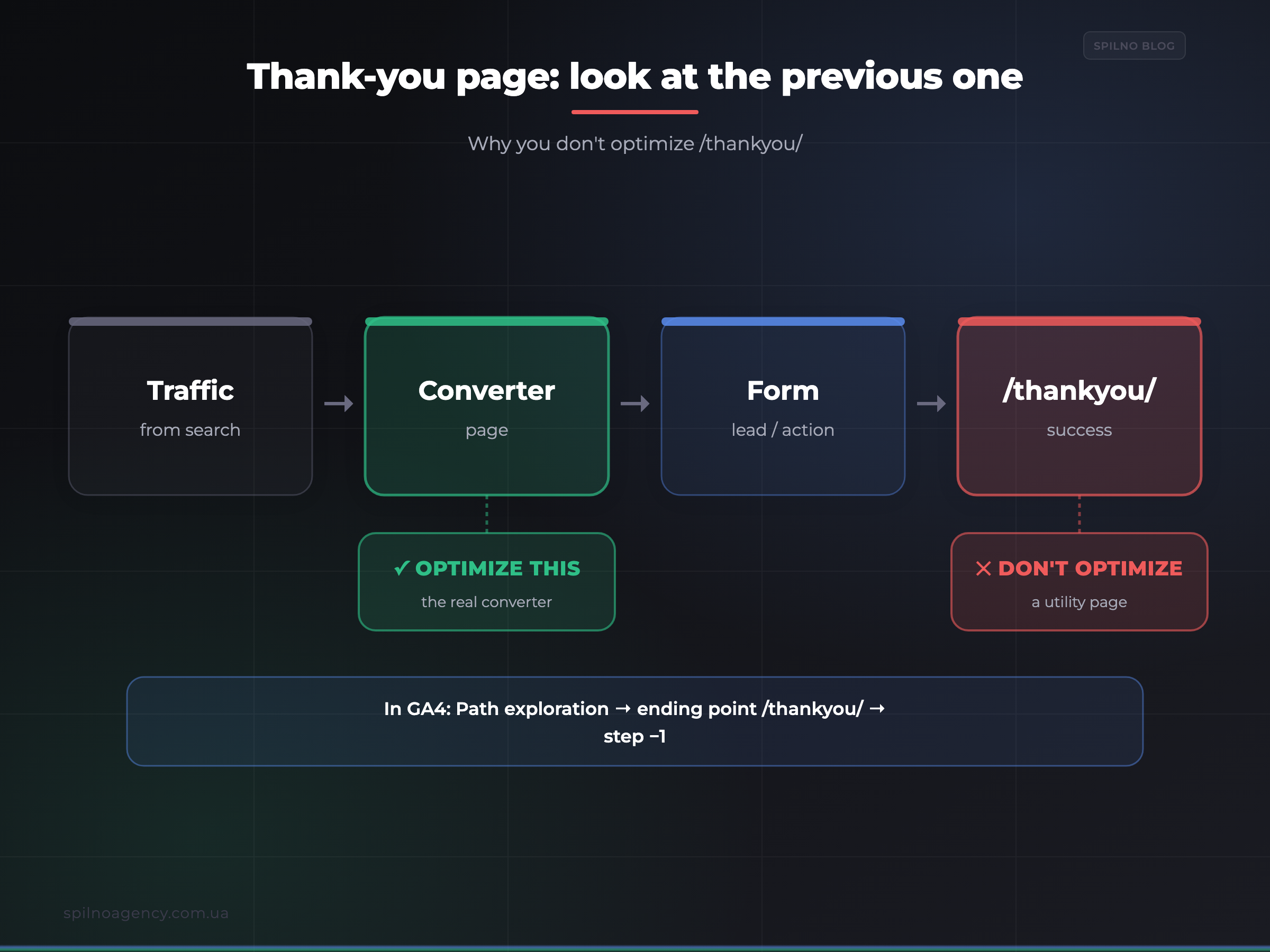
A thank-you page is a utility page. The user reaches it only after submitting a form or placing an order. It shows a huge number of conversions simply because every successful action on the site leads to it — not because it attracts search traffic itself. Nobody searches for it in Google, and there’s no point chasing rankings for it. Optimizing it for SEO is pointless.
But this page is very useful as a pointer: it tells you which page to optimize instead. Before clicking “Submit,” the user was on another page — the one that convinced them. It’s the previous page that did all the work and is the real candidate for optimization. Your task is to find it.
In Google Analytics 4 you do it like this:
Option A (quick):
  Reports → Engagement → Pages and screens
  └─ find /thankyou/ → add the secondary dimension "Landing page"
     → you'll see which page the converting session started on

Option B (precise):
  Explore → Path exploration
  └─ set the ENDING point = /thankyou/
  └─ step −1 shows the pages users moved to the thank-you page from
     → these are the real converter pages to optimize
For example, if step −1 before /thankyou/ is most often the homepage / and /pricing/, then those are what you optimize — not the thank-you page. This is how the “golden fund” list from Step 2 becomes more accurate: you replace utility pages with the real pages that lead to conversion.
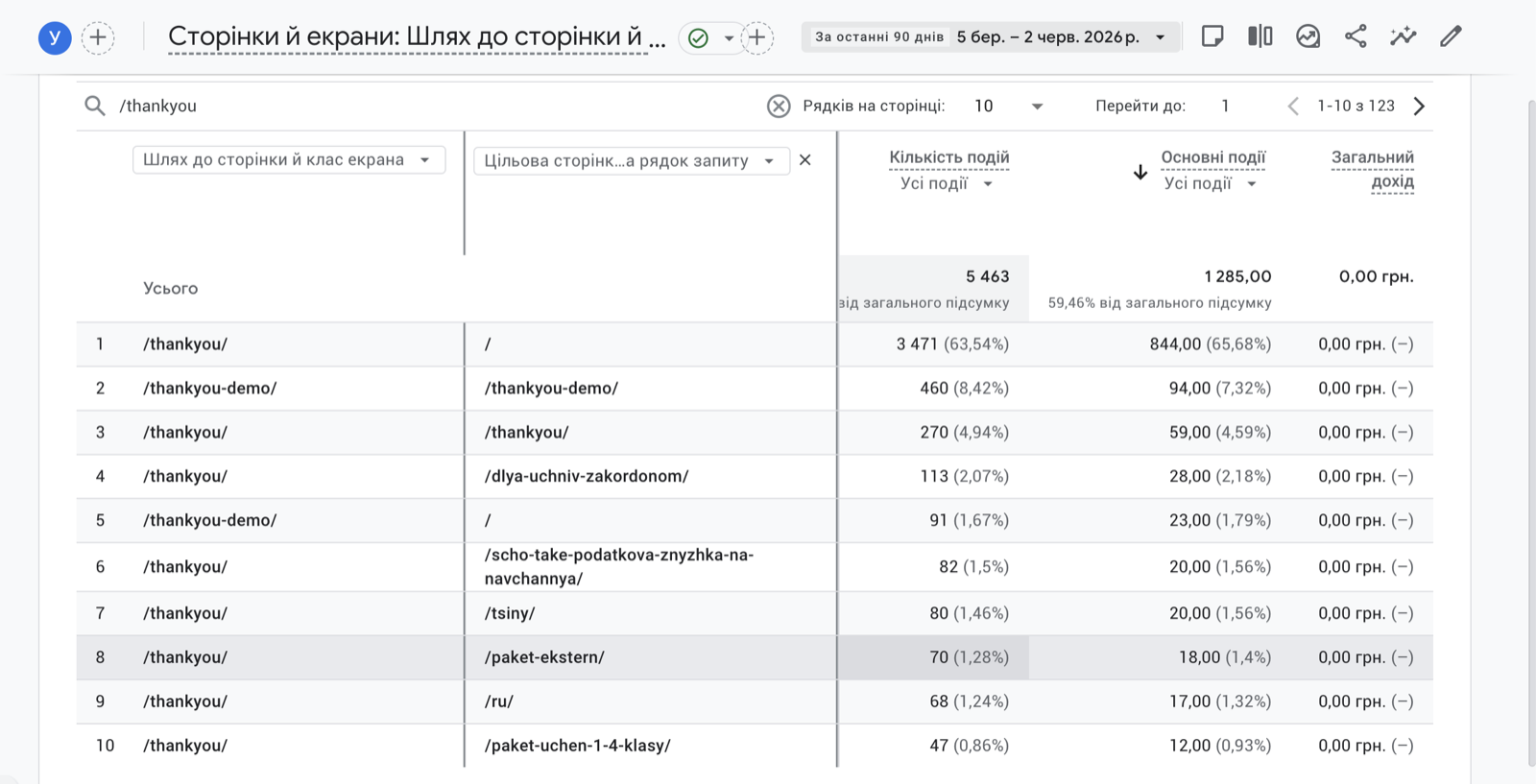
The same report with the secondary dimension «Landing page» added and filtered by /thankyou/. You can see which pages the converting sessions started on: most often the homepage / (844 conversions, 63.5%), followed by deeper pages. These previous pages are the real optimization candidates — not the thank-you page itself.
Which pages to exclude from the list
By the same logic as the thank-you page, you should remove all utility and transactional pages from the SEO optimization list — people don’t arrive on them from search, so there’s no point raising their rankings:
- Thank-you and confirmation pages —
/thankyou/,/order-received/,/success/. - Cart and checkout —
/cart/,/checkout/. - Account, login, registration —
/my-account/,/login/. - Technical and system URLs — internal site search, filters with parameters, demo and test pages (for example
/thankyou-demo/). - Language root as a “page” —
/en/,/de/: this is not a separate content page but an entry into a locale; analyze the specific pages inside it.
How to build the final list of pages to optimize
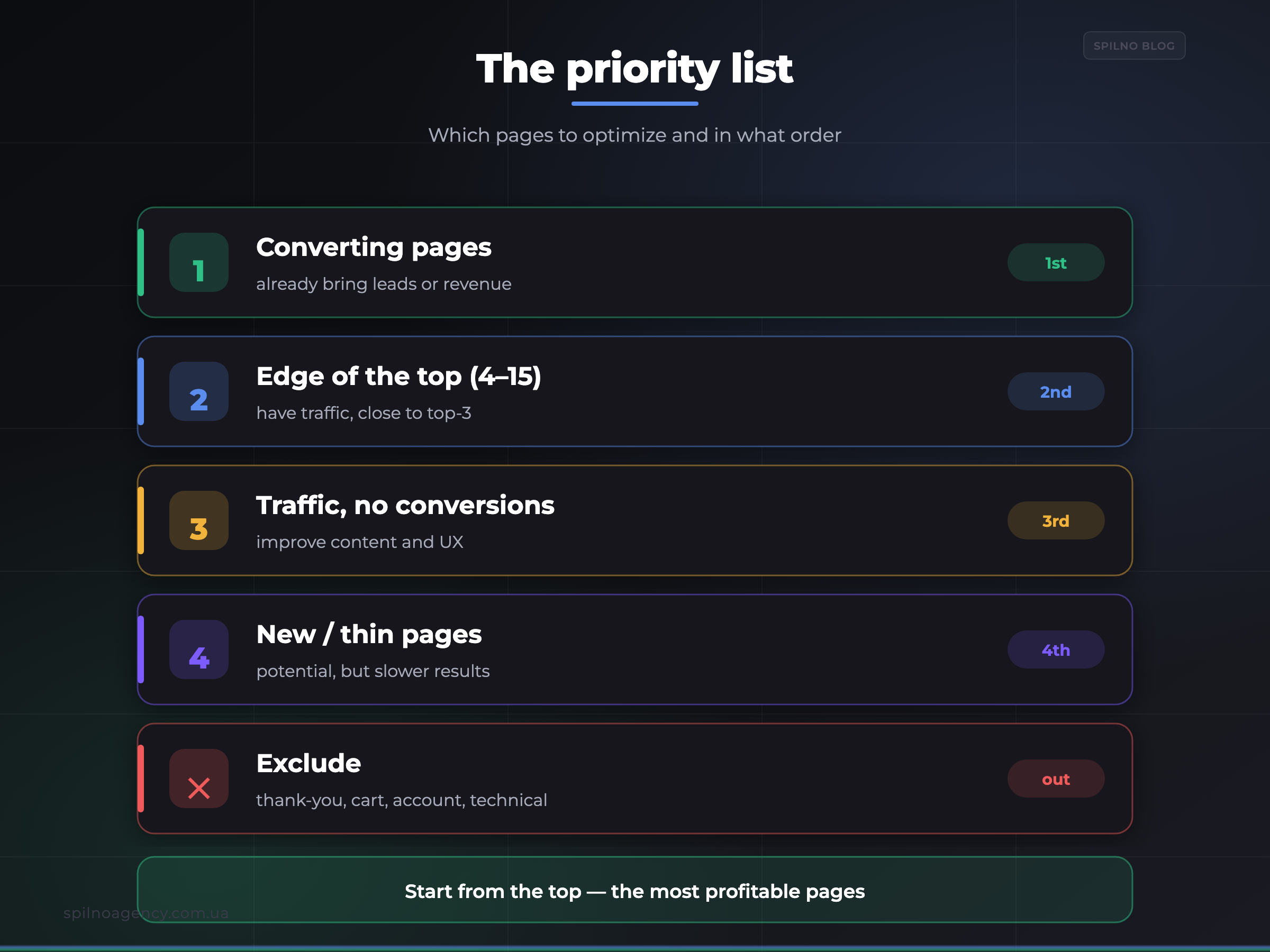
Bring it all together into a simple priority table. First what already converts; then pages with potential; utility pages out.
| Priority | Which pages | Why |
|---|---|---|
| 1. High | Real converter pages (with the “previous page” step applied) | Already bring leads/revenue — fast, predictable results |
| 2. High | Pages with traffic but rankings on the edge of the top (4–15) | A small push can reach the top 3 and sharply add clicks |
| 3. Medium | Pages with traffic but weak conversion | Work on content and UX so traffic starts to convert |
| 4. Low | New or thin pages with no rankings | Potential exists, but results take longer — after priorities 1–3 |
| —. Exclude | Thank-you, cart, checkout, account, technical URLs | Don’t attract search traffic — no point optimizing them |
After optimizing, track impressions and rankings in Google Search Console and conversions in GA4. That shows whether the changes worked and lets you move down the priority list as needed.
Common mistakes when choosing pages
- Optimizing the thank-you page. The classic trap: lots of conversions on
/thankyou/≠ SEO value. Look at the previous page. - Starting with the homepage “because it’s the homepage.” The homepage doesn’t always convert best for specific queries; let analytics drive the decision, not intuition.
- Relying on views alone. Many views without conversions are not yet a priority. Value lives in key events and revenue.
- Taking too short a period. 7 days is too little and too noisy. 90 days gives a steadier picture of seasonality and behaviour.
- Ignoring utility and test pages in the list. Demo, test and system URLs distort the top — filter them out right away.
Frequently asked questions (FAQ)
Which pages should you optimize for SEO first?
The ones that already convert according to Google Analytics 4. They’ve proven their commercial value, so even a small lift in rankings and traffic quickly turns into leads or revenue. Improving a working page is faster and safer than promoting a brand-new one from scratch.
How do you find converting pages in Google Analytics 4?
Open Reports → Engagement → Pages and screens and sort the table by the “Key events” column. For an online store, sort by “Total revenue.” The pages that deliver the most results will rise to the top.
Why shouldn’t you optimize the thank-you page (/thankyou/)?
It’s a utility page the user reaches after converting. It shows many conversions only because every successful action leads to it, not because it attracts search traffic. Optimize the page that preceded it instead.
How do you see which page preceded /thankyou/ in GA4?
Quick — add the secondary dimension “Landing page” in the Pages and screens report. Precise — in Path exploration, set /thankyou/ as the ending point and look at step −1. Add those previous pages to your optimization list.
Do you need to optimize every page on the site?
No. Resources are limited, so work by priority: converting pages first, then high-potential pages, then the rest. Utility pages (cart, checkout, thank-you, account) are excluded entirely.
Sort by number of conversions or by revenue?
For an online store with ecommerce tracking — by revenue (it accounts for both count and amount). For services and lead generation — by number of key events. Ideally, look at both together.
Want SEO that brings leads, not just traffic?
Spilno Agency audits your pages by analytics data, defines what to optimize first and builds a work plan with a forecast of results — for businesses across Europe. Get in touch and we’ll show you exactly which pages on your site can deliver the biggest growth.

Read also
cPanel SEO: How to Optimize Your Hosting for Search in 2026 (Enable & Disable)
cPanel is a hosting control panel that packs dozens of features with a direct impact on SEO: HTTPS…

Cloudflare for SEO: How to Configure It to Improve Search Performance in 2026
Cloudflare works as a proxy and CDN between the visitor and your website, and it can noticeably affect…

How Spilno Agency Does On-Page SEO Optimization with Claude
Spilno Agency runs on-page SEO optimization together with the AI agent Claude — following one document standard that…