Google Ads Removes Language Targeting for Search Starting September 2026

Google has announced that from late September 2026 it is removing the campaign-level language targeting setting for Search, AI Max for Search, and part of Performance Max — ads will instead be matched automatically based on the language of the ad itself, not a separate “language” field in campaign settings.
What’s changing
According to the Google Ads Developer Blog, on August 13, 2026 Dora Sun of the Google Ads API Team announced the change in an official post, “Google Ads language targeting changes starting September 2026” — and the change is relevant to anyone running campaigns in Google Ads, not just developers. The goal is to simplify how the system determines which audience language to serve ads to.
For Search and AI Max for Search campaigns, the campaign-level language targeting setting is removed entirely. Instead, ads will automatically match based on the language of the ad itself.
For Performance Max campaigns, the behaviour splits by channel:
- On Google Search — the campaign-level language setting is no longer used; matching works the same way as Search campaigns, based on the language of the ad.
- On other channels (YouTube, Display, Discover, Gmail) — the campaign-level language setting you select continues to apply and guides who sees your ads.
Where multiple eligible campaigns exist in an account, Google applies AI-based ad group prioritization to select the most relevant ad language for a given impression.
Key dates
- August 13, 2026 — the Google Ads API Team officially announced the change on the developer blog.
- Late September 2026 — the change takes effect. Google has not given an exact day, only the “late September 2026” window — worth tracking for a firm date.

Why Google is making this change
Google frames the goal as simplifying campaign management while maintaining a high-quality ad experience. Advertisers previously had to maintain a separate language targeting field that often drifted out of sync with the actual language of ads and landing pages — quietly narrowing reach for no good reason. The system now relies on the signal that was always the most accurate indicator of language anyway: the ad copy itself, combined with the user’s language preference.
What happens to the Google Ads API
For developers and teams managing campaigns via the API or scripts, the change has concrete technical consequences:
- Language criteria (
CampaignCriterion.language) will still be returned on read queries, even though they no longer apply to targeting. - Any mutate that adds or updates
CampaignCriterion.languagefor a Search campaign will return aContextError.OPERATION_NOT_PERMITTED_FOR_CONTEXTerror. - For Performance Max campaigns, the same mutate will not error, since language targeting may still apply on channels outside Search.
Existing Search and AI Max for Search campaigns will keep running without disruption — their language settings simply stop influencing delivery. Google recommends two concrete code changes: stop including language criteria when creating new Search campaigns, and make sure ad creatives and landing pages are clearly structured in the intended language, since that’s now the primary signal for language matching.
What advertisers and developers should do
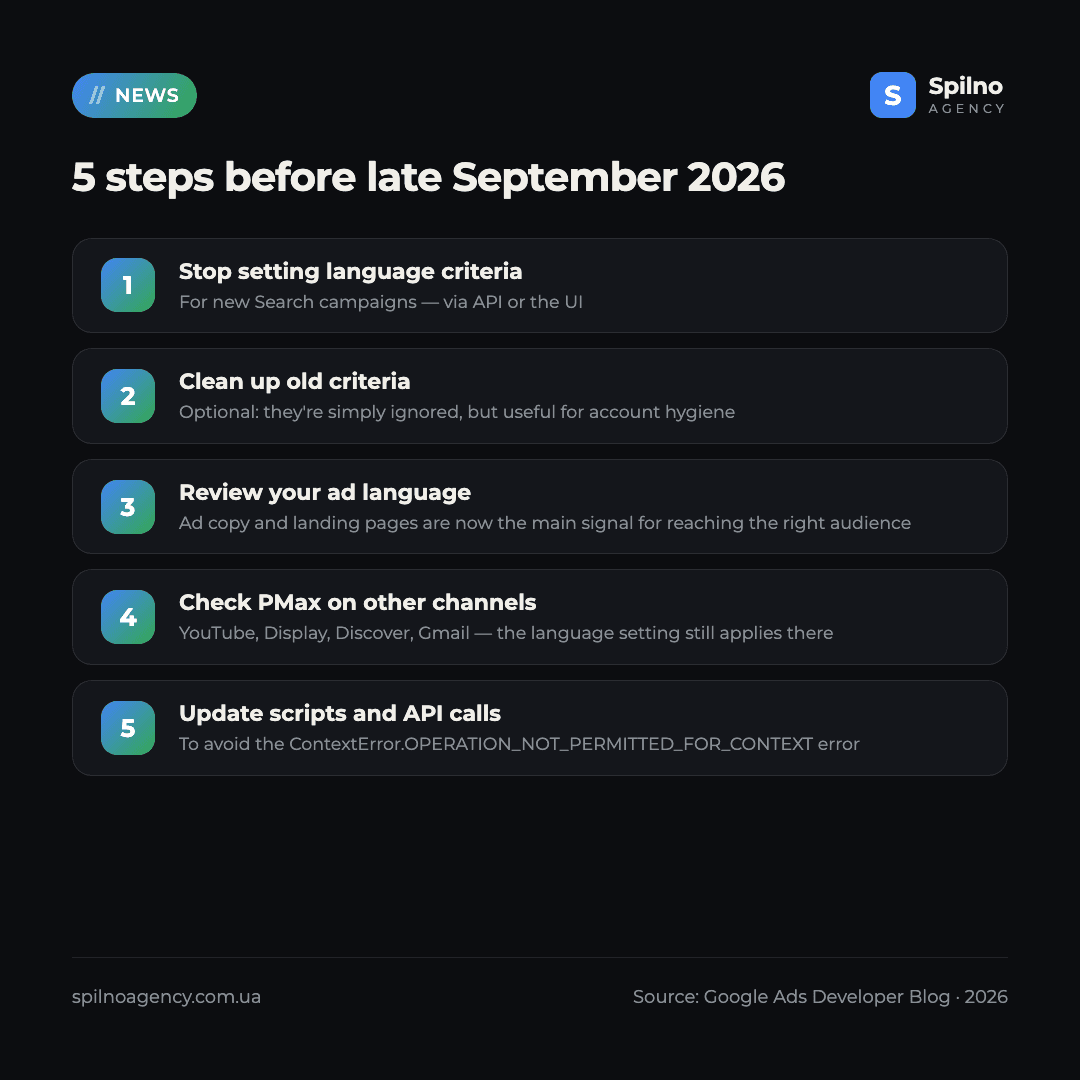
- Stop setting language criteria on new Search campaigns — via the API or the UI — they will no longer affect targeting.
- Optionally clean up existing language criteria on Search campaigns — not required, since they’ll simply be ignored, but useful for account hygiene.
- Review your ad and landing page language. Ad copy and landing page structure are now the main signal for reaching the right audience, so make sure they’re clearly written in the target language.
- For Performance Max, double-check the language settings meant for YouTube, Display, Discover, and Gmail — those still apply, so review them specifically.
- Update scripts and API integrations that mutate Search campaign language criteria before late September, to avoid the
ContextError.OPERATION_NOT_PERMITTED_FOR_CONTEXTerror.
Who is affected
Search and AI Max for Search campaigns are fully affected — the campaign-level language setting disappears for them with no exceptions. Performance Max is partially affected: the change only applies to delivery on Google Search, while YouTube, Display, Discover, and Gmail continue to use the campaign-level language setting as before. Google’s announcement doesn’t mention any other campaign types, so it would be premature to assume the change extends to formats not named here.
Spilno Agency’s take
In practice, this change removes a routine but important responsibility from advertisers — keeping the campaign “language” field aligned with the actual language of your ads. The real risk now shifts to the quality of your language structure: if an ad and its landing page are written in a language that doesn’t match the intended audience, automatic matching will perform worse than the old manual setting did. Our recommendation for European businesses running multilingual campaigns: go through your accounts now and confirm that each language version has its own dedicated ads and landing pages, rather than one mixed-language campaign. If you’d like a second set of eyes on your account’s language structure before September, Spilno Agency’s team is glad to help.
Not sure how the language targeting change will affect your Google Ads campaigns? Spilno Agency will review your ad and landing page language structure, check your Performance Max settings for YouTube, Display, and Gmail, and get your account ready for the September 2026 changes. Get in touch — we start with a free audit.
If you’re still getting familiar with Performance Max, where the language logic now splits by channel, our Performance Max guide for beginners walks through how the campaign type works and what to watch in the settings. And if you’d like to check how ready your account is for the change, request a free Google Ads audit.
Frequently asked questions
What’s changing in Google Ads from September 2026?
Google is removing the campaign-level language targeting setting for Search and AI Max for Search campaigns — ads will automatically match users based on the language of the ad itself. For Performance Max, this only applies to delivery on Google Search; the campaign-level language setting still applies on YouTube, Display, Discover, and Gmail.
When exactly does the change take effect?
Google has given an approximate window — late September 2026 — without stating an exact date. The change was announced on August 13, 2026.
Do I need to remove language criteria from existing Search campaigns?
Not necessarily. Existing language criteria will simply stop affecting targeting and will still be returned when queried via the API. Removing them is only a matter of account cleanliness, not a requirement from Google.
What happens if I try to add a language criterion via the Google Ads API?
For a Search campaign, any attempt to add or update CampaignCriterion.language will return a ContextError.OPERATION_NOT_PERMITTED_FOR_CONTEXT error. For Performance Max campaigns, the same operation will not error, since language targeting can still apply on channels outside Search.
Is Performance Max fully affected by this change?
No. The change only affects Performance Max delivery on Google Search, where the campaign-level language setting is no longer used. On YouTube, Display, Discover, and Gmail, the campaign-level language setting continues to determine who sees your ads.
What does Google Ads use to determine ad language now?
The language of the ad copy itself, combined with the user’s language preferences. Google recommends making sure your ad creatives and landing pages are clearly and consistently written in the intended language, since that’s now the main signal for matching.
Will language targeting change in Search Ads 360 or Google Ads Editor too?
The official announcement describes the change at the level of the Google Ads systems and the Google Ads API — that’s where language targeting behaviour changes for Search campaigns and Performance Max. If you manage campaigns through third-party tools, check their documentation separately.
Where can I get support on this change?
The Google Ads API Team points to two official channels: a support form for specific technical issues, and the “Google Advertising and Measurement Community” Discord server for questions and discussion.

Read also
Google Ads Rolls Out New Testing and Planning Tools for AI Max
Google Ads announced Multi-Campaign Budget Testing, Enhanced Experiment Controls and an improved Performance Planner for AI Max. Key…
Google Merchant Center: Minimum Product Image Size Becomes 500×500 px in 2027
From January 31, 2027, Google Merchant Center requires product images of at least 500×500 px. What changes, key…
Search Console Glitch: Generative AI Report Impressions Down Since August 13
On August 13, 2026, Google confirmed a logging error that understates the number of impressions in the “Generative…